Twenty Thousand Roads
Twenty thousand roads I went down, down, down
And they all led me straight back home to you
I’ve been keeping a driving log for sixteen years, and have accumulated hundreds of thousands of miles of driving tracks.
Return of the Grievous Angel has been in my playlists for years, so I’m not sure why I didn’t think of it sooner, but recently I realized that with my log I actually could figure out whether I’d actually driven down twenty thousand different roads. (I’m sure Gram Parsons meant “twenty thousand” metaphorically, but darn it, I have the data to be literal about it!)
After a few weeks of work, I found that I have driven down twenty thousand different roads. But it really depends on what counts as a road, which was an unexpectedly difficult question.
Table of Contents
What’s a Road?
In principle, this effort should be pretty easy, right? It’s just counting roads that I’ve been down.
But what actually qualifies as a road? Is it anything I can drive on? If I’m going down Main Street it seems obvious, but what if I’m driving down a parking lot aisle? Are driveways technically roads? What about things like highway ramps? Does a dirt road count? What if I drive across grass often enough that it becomes a dirt track?
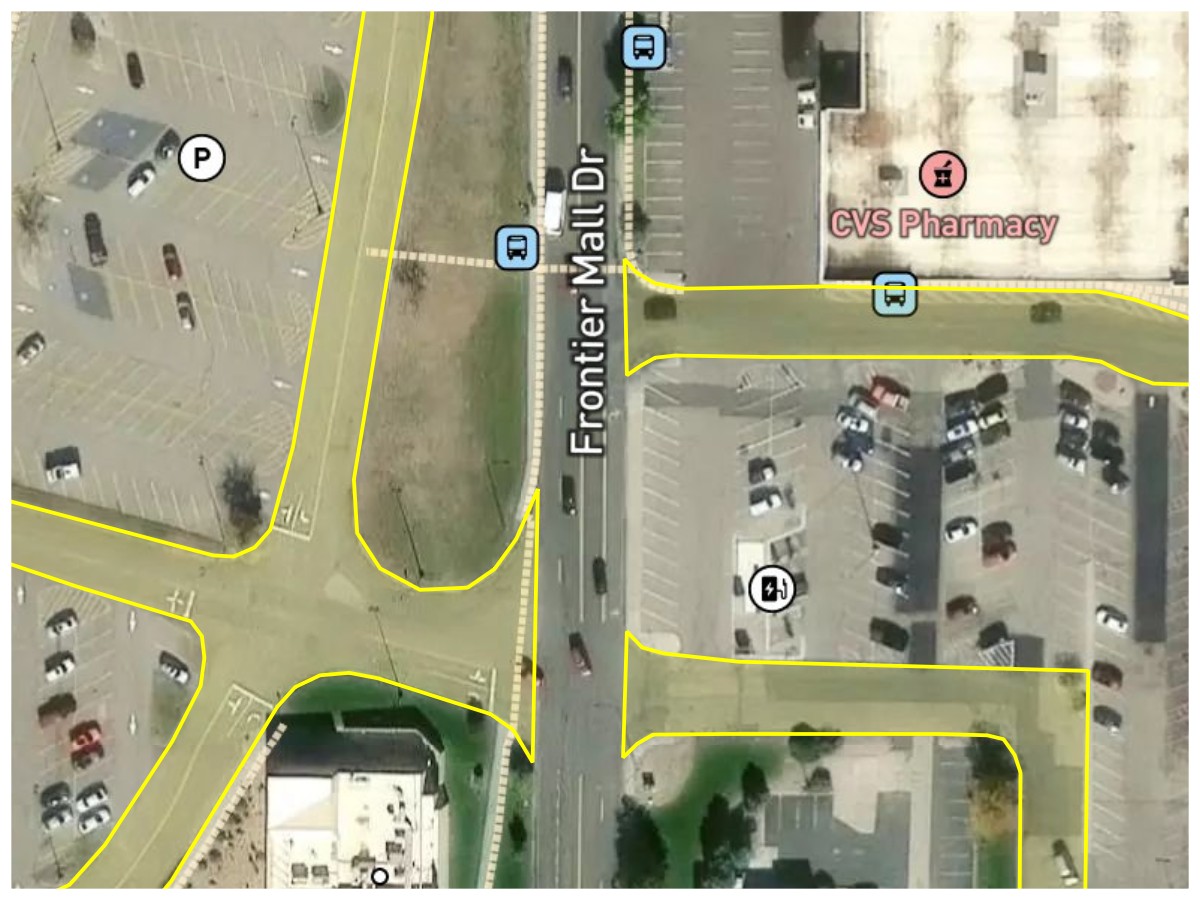
Parking Lot Service Roads. Frontier Mall Drive should clearly be counted as a road, but the unnamed parking lot driveways (highlighted in yellow) probably shouldn’t. The actual parking lot aisles definitely shouldn’t.
Basemap © Mapbox © OpenStreetMap (Improve this map)
I ultimately decided that if something wasn’t important enough to have its own name or number, then it shouldn’t count as a road.
Road Rule #1: A road is a surface that either keeps a single name (named road) or route number (numbered route) along its drivable length. Unnamed roads such as driveways and service roads don’t count.
What if there’s a small gap in the road? Many roundabouts are unnamed, so does a named road count as a new road on the other side of a roundabout? Some roads have slight jogs at intersections leaving small gaps. And some numbered routes just stop for a while and pick up later.
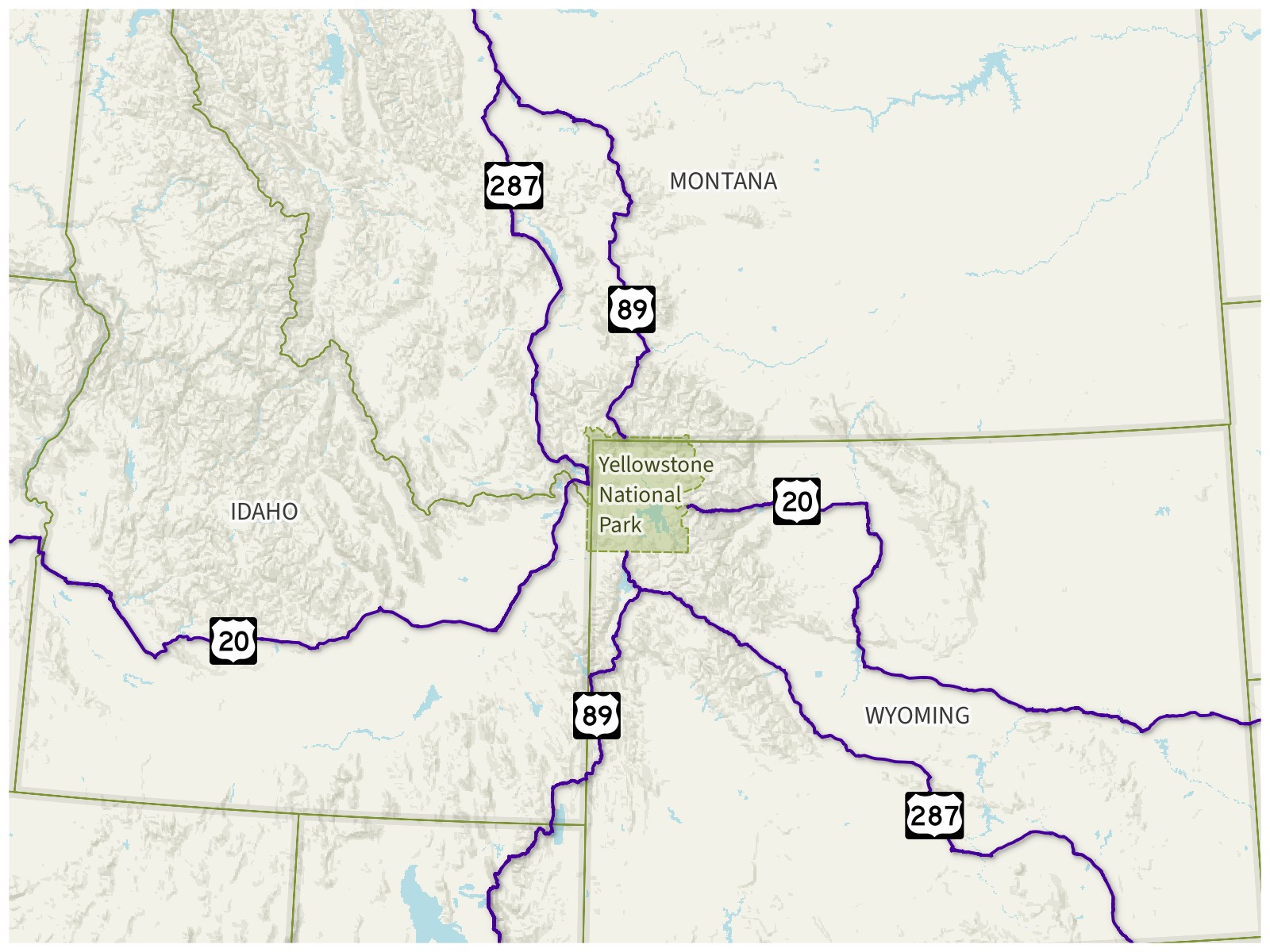
Route Gaps at Yellowstone. US-20, US-89, and US-287 all stop at the boundary of Yellowstone National Park and restart on the other side of the park, leaving a gap in each of their routes.
Basemap © Mapbox © OpenStreetMap (Improve this map)
For numbered routes, both OpenStreetMap and Wikipedia count numbered routes with gaps as a single route, and this made sense to me.
Named roads are a little more difficult. Multiple non-adjacent cities could have a road with the same name, and I think very few people would consider those the same road. Even some adjacent cities (suburbs of the same city) could have roads with the same name, and the only time I’d want to count that would be in the case where a road continues across a city border and keeps the same name. So I needed to set a pretty small maximum gap distance for named roads. I ended up settling on 100 meters, which was big enough to handle some of the biggest unnamed roundabouts while still making it unlikely that actually separate roads are counted as the same road.
Road Rule #2: Named roads with small gaps (less than 100 meters) for things like roundabouts or offset intersections still count as the same road. Numbered routes with any gap still count as the same road.
Okay, but what counts as going down a road? If I’ve been on any part of it, does that count? Do I have to drive its entire length, a certain portion of it, some minimum distance, or just any part of it?
I don’t think having to drive the entire road is right; I would colloquially say “I drove down Main Street” even if I didn’t go from where Main Street started to where it ended. So if I’ve driven on any part of a road, it counts.
Road Rule #3: Driving on any part of a road counts as driving on that road.
If I’ve been on two different parts of the same road, does that count as multiple roads? What if the road is over 3000 miles long and I’ve driven on both ends of it?
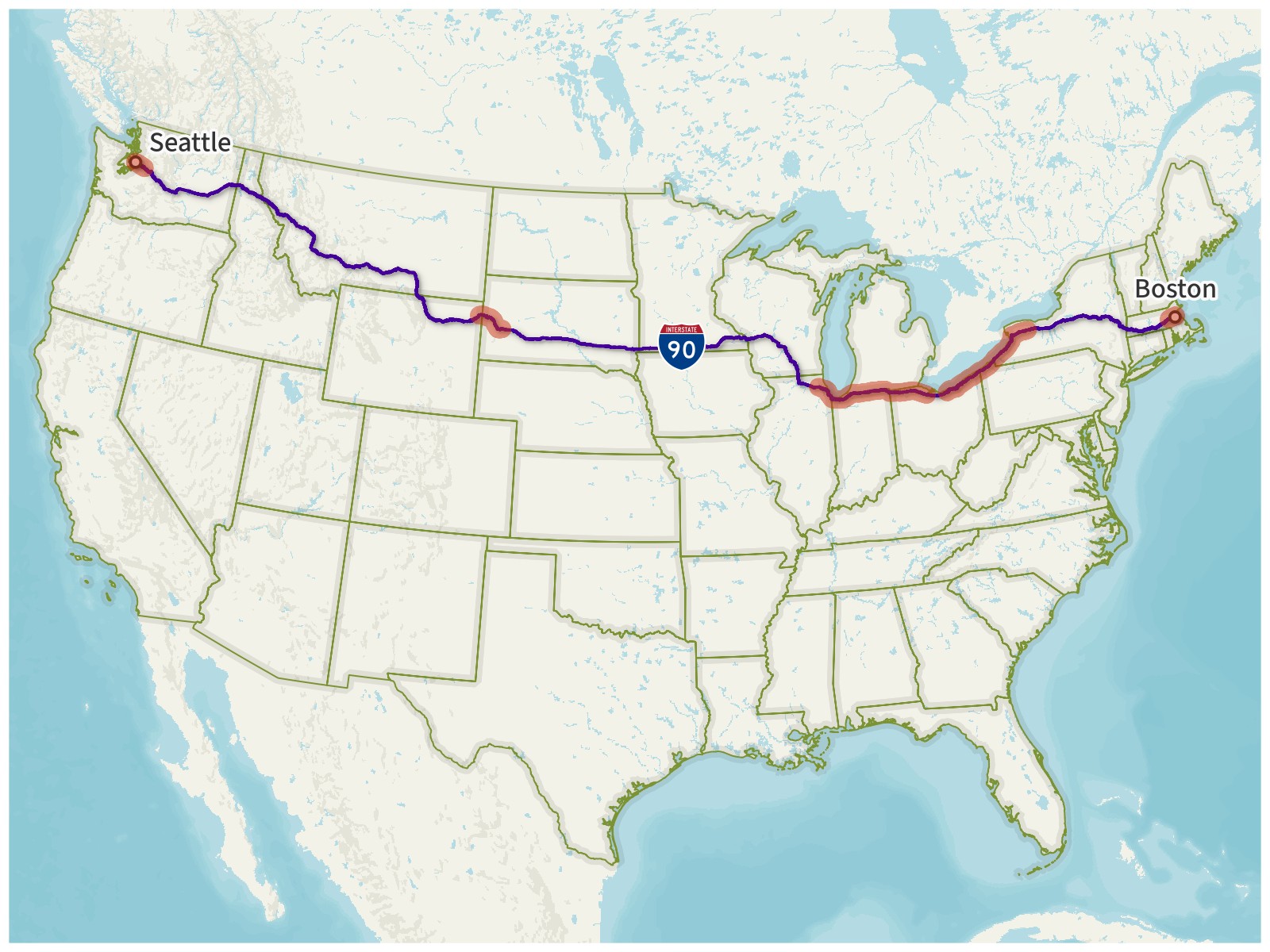
Interstate 90. With a length of 3100 miles (4989 km), I-90 is the longest Interstate Highway in the United States. I’ve driven on multiple different parts of it (highlighted in red), but I’ve never driven the entire length of it. It should still only be counted once.
Basemap © Mapbox © OpenStreetMap (Improve this map)
Counting different parts of a road would introduce a lot of complications. If I drove on I-90 in both Boston and Seattle and counted it as two roads, then what would happen if I eventually drove the whole length of I-90 and connected them? Would it become one road again?
Even without these sorts of complications, counting different parts of the same road separately really felt like unfairly running up the score. I decided to count each road only once.
Road Rule #4: Each road may only be counted once, even if multiple separate parts of it are driven on.
Now, what if a road has both a name and a route number?
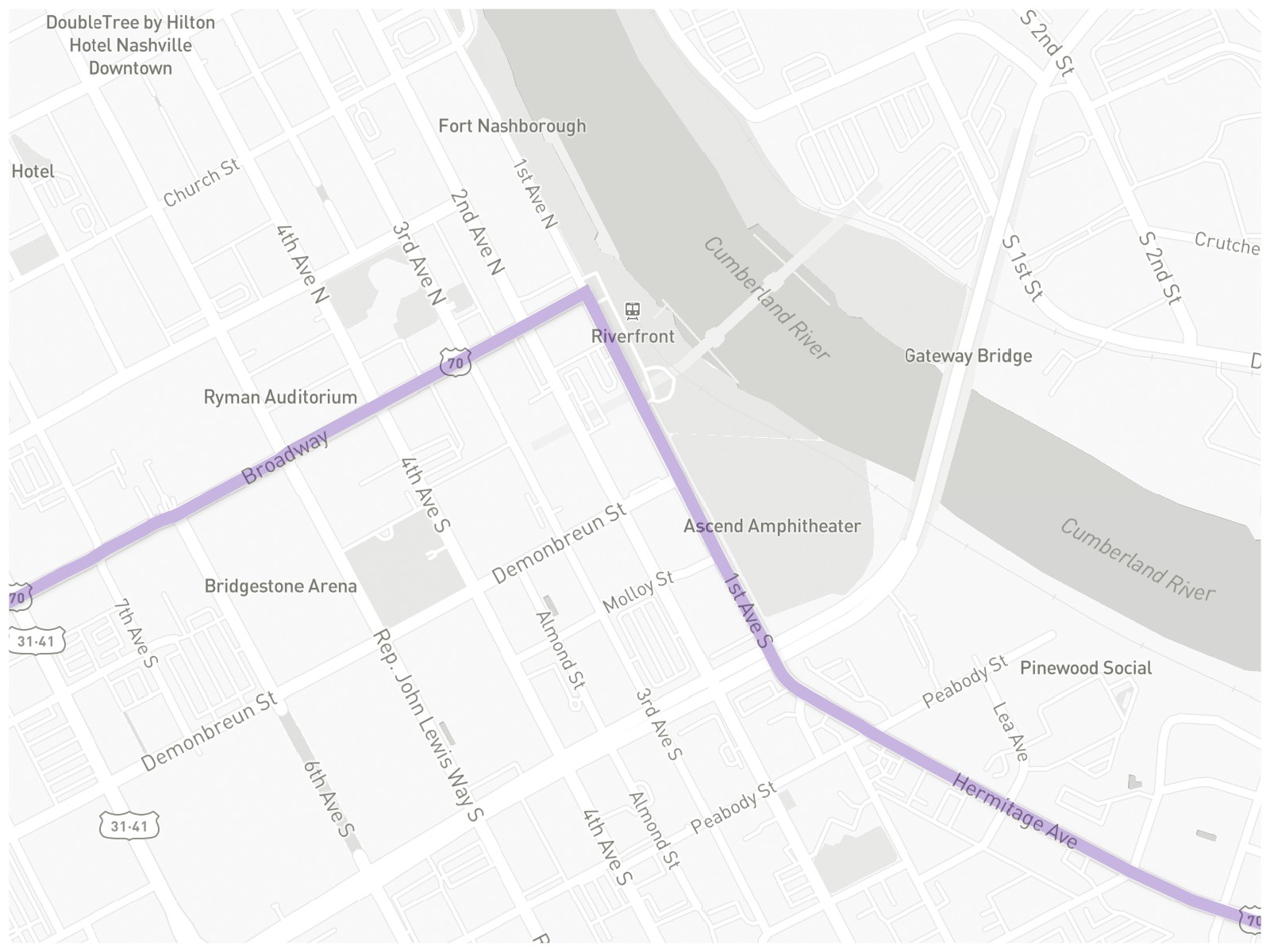
U.S. Route 70. This section of US-70 (highlighted in purple) also overlaps Broadway, 1st Avenue South, and Hermitage Avenue.
Basemap © Mapbox © OpenStreetMap (Improve this map)
If I’d driven along the purple line above, I clearly drove on US-70, but I also drove on Broadway, 1st, and Hermitage as well. All of them should probably be counted (if they haven’t already been counted).
I do see an exception to this, though, in the case where a named road entirely belongs to a numbered highway. For example, the entirety of the Capital Beltway around Washington, D.C., follows I-495. Since I-495 would already be counted, the Capital Beltway shouldn’t be counted as a separate road.
What if it has multiple route numbers? What if it has them to a ridiculous degree?
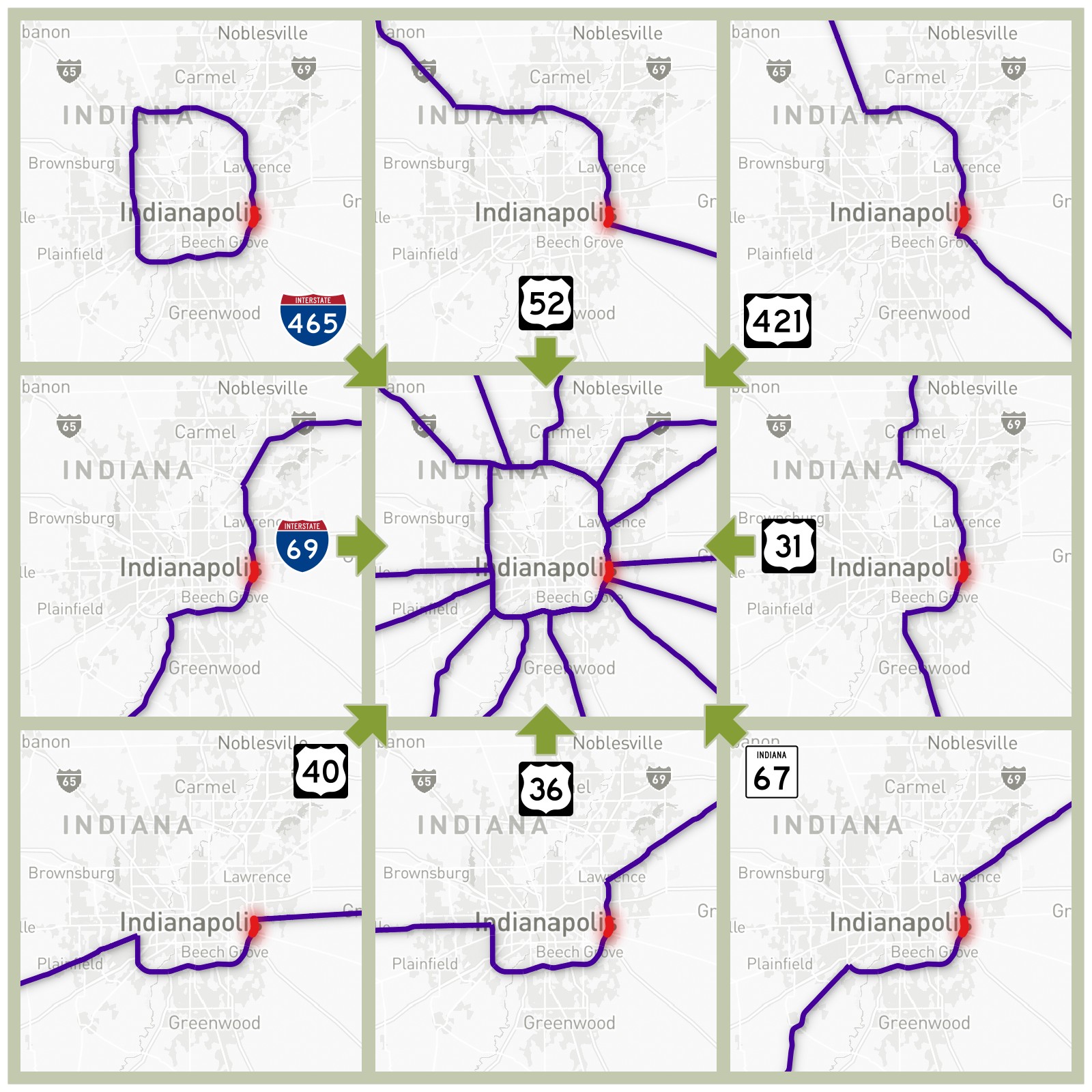
8-Way Concurrency in Indianapolis. Between I-465 Exit 46 (Washington Street) and Exit 47 (Brookville Road) on the east side of Indianapolis, eight numbered routes share the same section of road, highlighted in red. The eight routes are I-465, I-69, US-31, US-36, US-40, US-52, US-421, and Indiana State Road 67.
Basemap © Mapbox © OpenStreetMap (Improve this map)
While most route concurrencies aren’t quite this extreme, if I drove on the red section, I’ve clearly driven on at least part of all eight of these routes. They should all be counted (again, if each of them has not already been counted).
Road Rule #5: If multiple roads overlap at the same point, such as a named road with a numbered route following it, or multiple numbered routes having a concurrency, all of those roads are counted. However, if virtually all of a named road belongs to a specific numbered route (for example, the Capital Beltway and I-495 around DC), only the numbered route is counted.
With these five rules set, I was ready to begin counting.
Counting Roads
My actual driving log data doesn’t exactly contain roads; it’s purely lines between series of latitudes and longitudes. On its own, it has no awareness of road names or route numbers, so I needed something to compare it to.
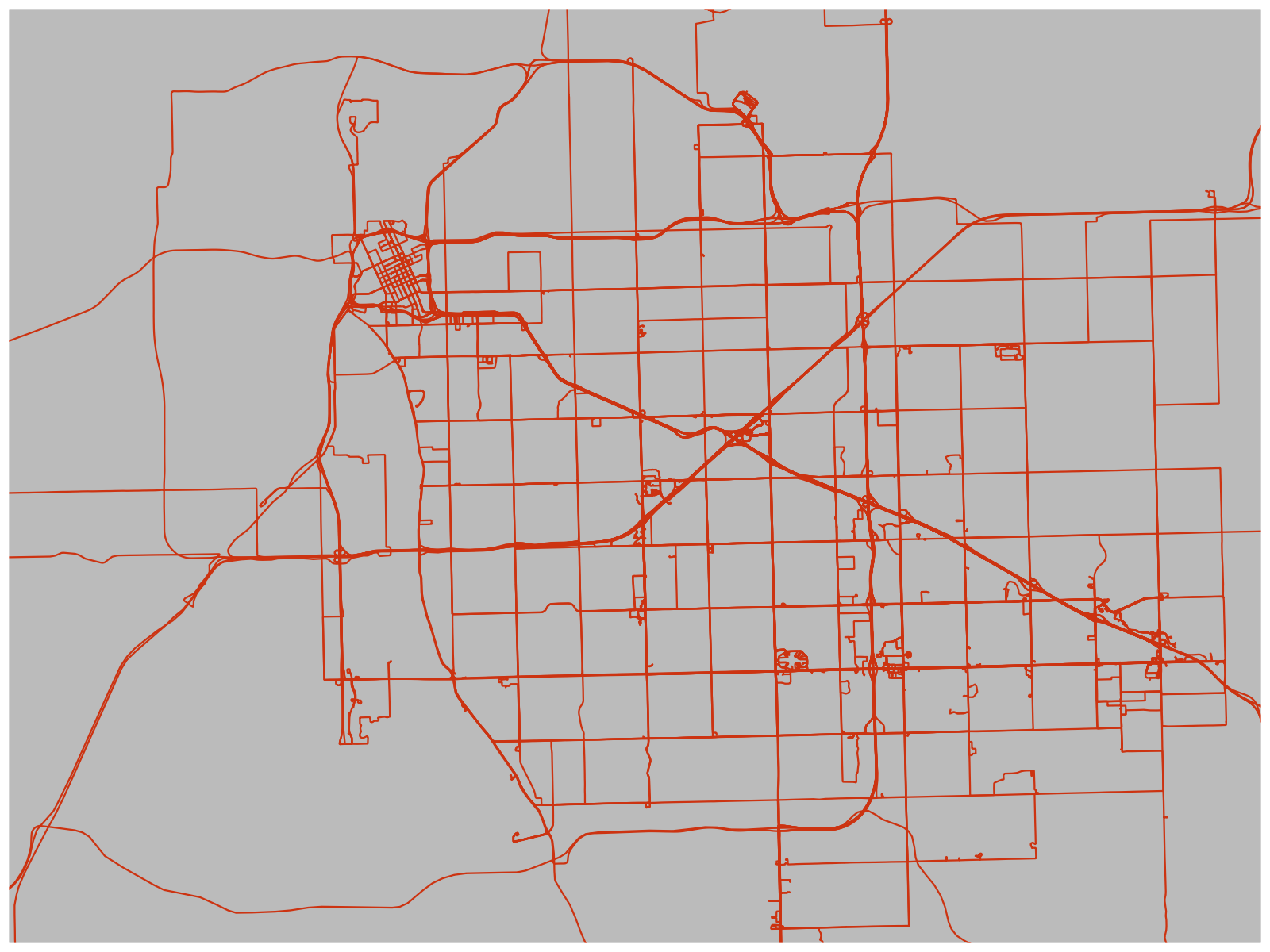
Raw Driving Log Tracks in Tulsa. The tracks show the shapes of my drives, but don’t know what roads they’re on. To figure that out, I have to compare the tracks to a road database.
Fortunately, OpenStreetMap has a good collection of road data available for free. I downloaded four gigabytes of OpenStreetMap road data covering the nine countries in my driving log (the United States including Puerto Rico, Canada, Germany, U.K., Iceland, Australia, New Zealand, Sweden, and Japan). I then wrote a script to loop through all the tracks in my driving log, matching them to the OpenStreetMap roads. (See Technical Details below for more information on the script.)
So have I driven on 20 000 roads?
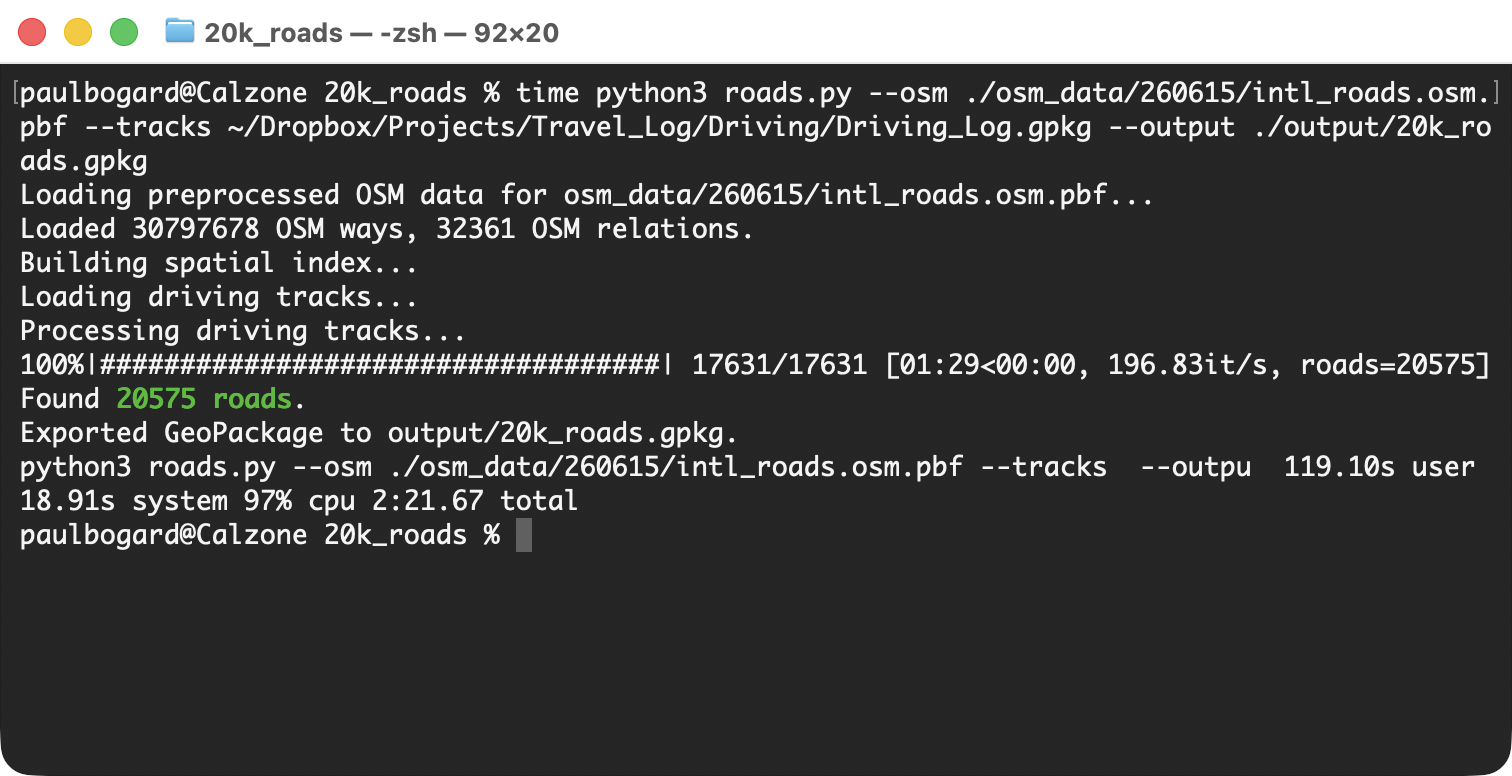
My script tells me that as of June 2026, I’ve driven on 20 575 unique roads.
Yes, but just barely! My twenty thousandth road was Aberdeen Avenue in Ashtabula, Ohio, in November 2025.
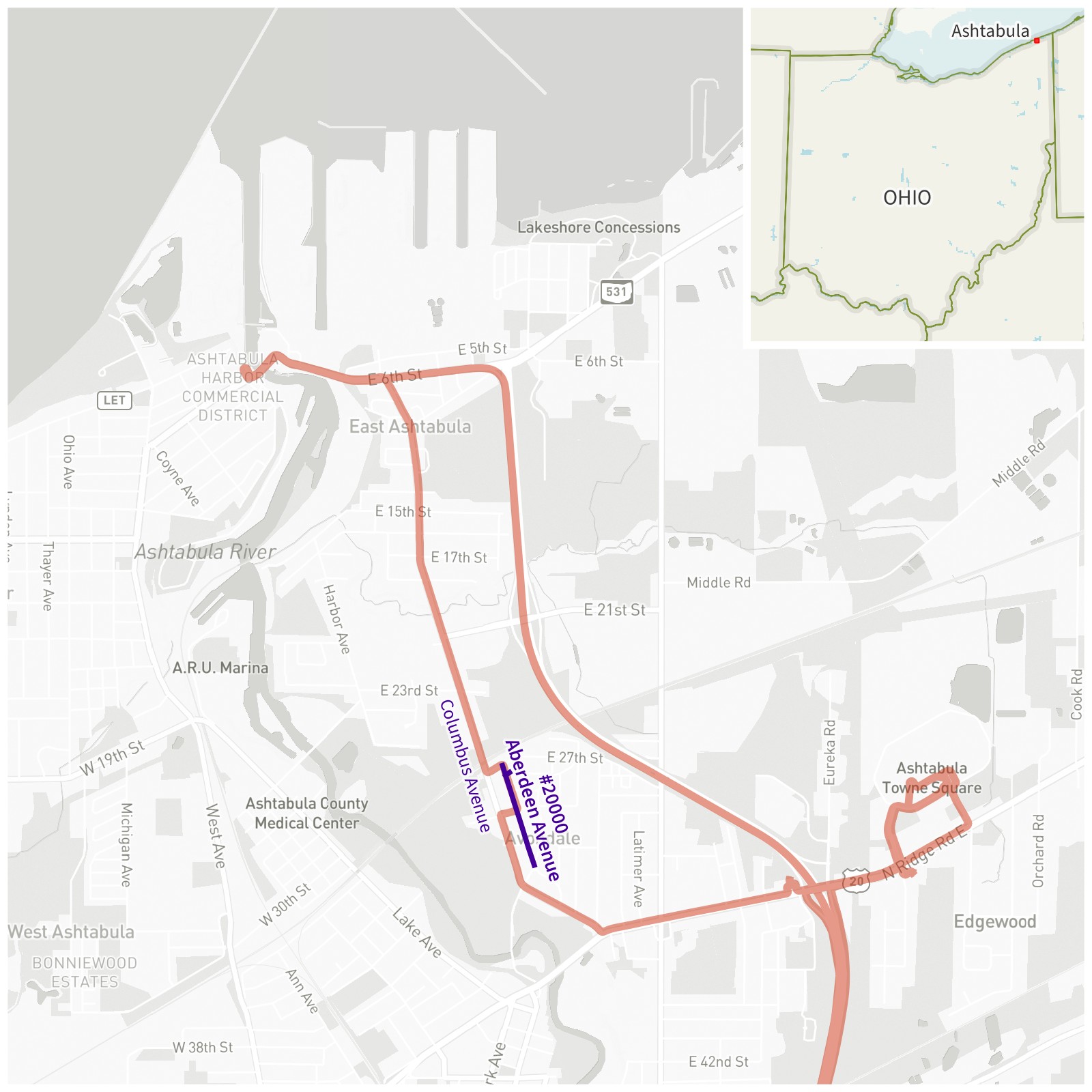
Ashtabula, Ohio. Aberdeen Avenue, the 20 000th road I’ve been down, is shown in purple. My driving tracks are red.
Basemap © Mapbox © OpenStreetMap (Improve this map)
We were driving from the Ashtabula Towne Square mall, up Columbus Avenue, and heading toward the Ashtabula Harbor Commercial District to get some coffee by the bascule drawbridge. Some utility work had closed a small portion of Columbus Avenue, and we were detoured into neighborhood streets, including Aberdeen Avenue.
(When we got to the harbor, it was unfortunately the off-season for river traffic, and we didn’t get to watch that river bridge open up.)
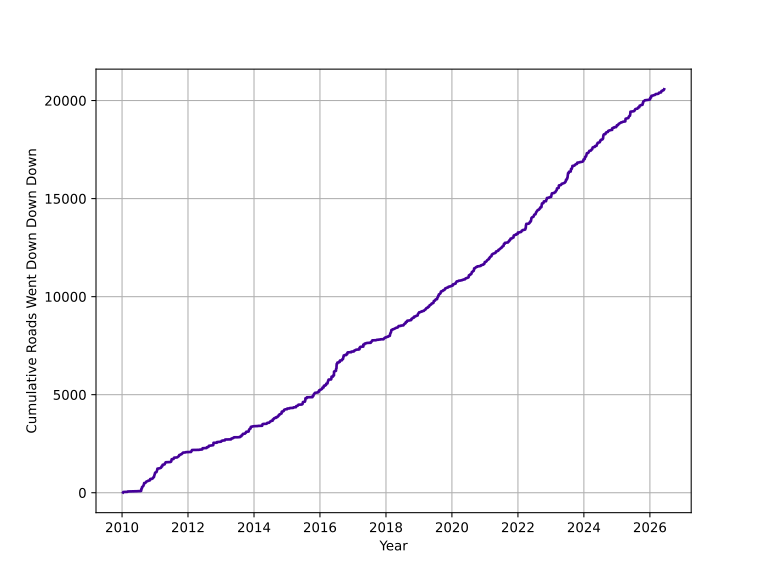
Cumulative Roads Traveled by Date
Plotting roads by year, it looks like my rate of adding new roads has been relatively constant. I’d initially expected that the slope would get shallower over time (as I’d be driving on a lot of roads that had already been counted), but it seems that I visited enough new destinations to cancel that out.
Known Limitations
-
My driving data only goes back to 2010, and even 2010 is somewhat sparse. I’ve been driving since 2000, and rode on roads as a passenger for sixteen years before that. My true twenty thousandth road probably occurred much earlier than the one I found above.
-
Roads have changed over time. This project is comparing my driving to a June 2026 extract of OpenStreetMap, but quite a few roads have changed between 2010 and 2026. Some roads have been renamed in whole or in part, and since my counting depends on road names, this could affect the count. Some roads have been moved slightly, so my driving track may not line up with current road geometry. Some roads that I drove on no longer exist, such as the Alaskan Way Viaduct in Seattle (which has been replaced by a tunnel under the city).
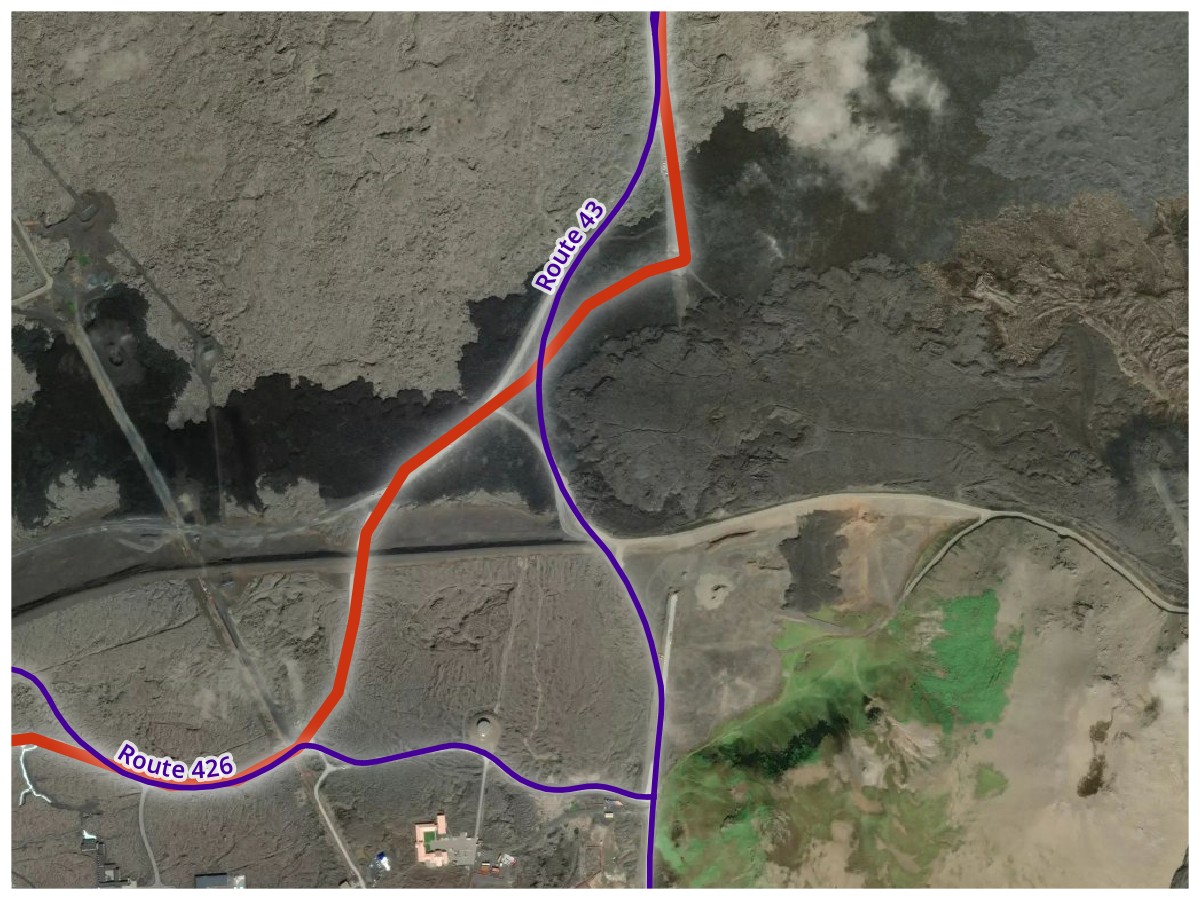
Road Changes. I drove the red track along Iceland Routes 426 and 43 in August 2019. Because of the 2023–2025 Sundhnúkur volcanic eruptions, the roads had to be moved, with their June 2026 paths shown in purple.
Basemap © Mapbox © OpenStreetMap (Improve this map)
-
OpenStreetMap Data isn’t perfect. As a crowd-sourced worldwide map, it’s very good. But given the sheer number of roads I’m looking at, I came across some flaws where things were misnamed, incorrectly categorized, or had incorrect relations. Fortunately, I could also edit OpenStreetMap and fix any errors I found, but it’s still likely I missed some.
-
Some Unnamed Roads May Be Significant. While I believe it was the correct decision to exclude unnamed roads since the vast majority of them probably shouldn’t be counted for this project, there are still a few places I found where something that had no name but still functioned as a road. This was especially an issue in Japan, which has a unique addressing system that doesn’t depend on road names, so many significant roads are unnamed. At least Japan is only a tiny fraction of my driving, but roads there are certainly undercounted.
-
Double decker roads have problems. My driving log data is two dimensional (latitudes and longitudes only), so it can’t distinguish between lower and upper levels of double decker roads. OpenStreetMap data itself only really distinguishes layers (to know which road to show on top) rather than altitude. And GPS signals are going to be very hard to get on the lower level of a multilevel road. In practice, this means that driving tracks are more likely to be missing for lower level roads, but driving tracks for upper level roads will likely match both the lower and upper level since they share the same latitudes and longitudes in the OSM data. Chicago’s urban center has many multilevel roads and was the biggest contributor to this issue for my data.
-
Ferries are not included. I can see some arguments that car ferries could count as a road (some ferries are part of numbered routes). Since the car’s not moving under its own power, though, I ultimately decided not to include them.
-
Some short, straight roads may be missed. Nearly all of my driving log tracks have been simplified, removing points that don’t change the track’s shape to save space. Multiple track points need to be closest to a given road for that road to be counted, and some roads may not match enough points, especially ones that are short with no curves. I did a review of my most visited cities and manually re-added some additional points to my tracks where needed, but it’s possible I missed some. (More technical details are provided in Matching Tracks to OSM Ways below.)
My Most Frequent Road Names
As a bonus, I used the results of my road counting to create a list of the top 15 most common names on all of the roads I’ve driven.
| Rank | Name | Count |
|---|---|---|
| #1 |
Main
Street (281), Avenue (8), Circle (1), Drive (1)
|
291 |
| #2 |
Washington
Street (66), Avenue (13), Boulevard (11), Circle (2), Road (2), Drive (1), Lane (1), Parkway (1)
|
97 |
| #3 |
4th
Street (67), Avenue (24)
|
91 |
| #4 |
2nd
Street (70), Avenue (16)
|
86 |
| #5 |
5th
Street (58), Avenue (21)
|
79 |
| #6 |
1st
Street (55), Avenue (21)
|
76 |
| ⋮ |
Broadway
Street (28), no suffix (27), Avenue (14), Boulevard (5), Place (1), Road (1)
|
76 |
| #8 |
3rd
Street (60), Avenue (14)
|
74 |
| #9 |
6th
Street (51), Avenue (18)
|
69 |
| #10 |
Park
Avenue (31), Street (12), Drive (6), Road (5), Lane (4), no suffix (3), Boulevard (3), Place (3), Way (1)
|
68 |
| #11 |
Central
Avenue (45), Parkway (4), Street (4), Boulevard (3), Drive (2), no suffix (1)
|
59 |
| #12 |
Airport
Road (22), Boulevard (16), Drive (10), Way (5), Parkway (3)
|
56 |
| ⋮ |
7th
Street (44), Avenue (12)
|
56 |
| #14 |
Market
Street (50), Place (2), no suffix (1)
|
53 |
| #15 |
Walnut
Street (40), Avenue (8), Road (1)
|
49 |
Not surprisingly, Main Street was by far the most common. It’s interesting to see that Airport made it into the top fifteen, but I suppose I do drive near airports a lot.
Though it didn’t make the top list (with only one instance), my favorite is Run Way, a short road next to a general aviation airfield in Middletown, Ohio.
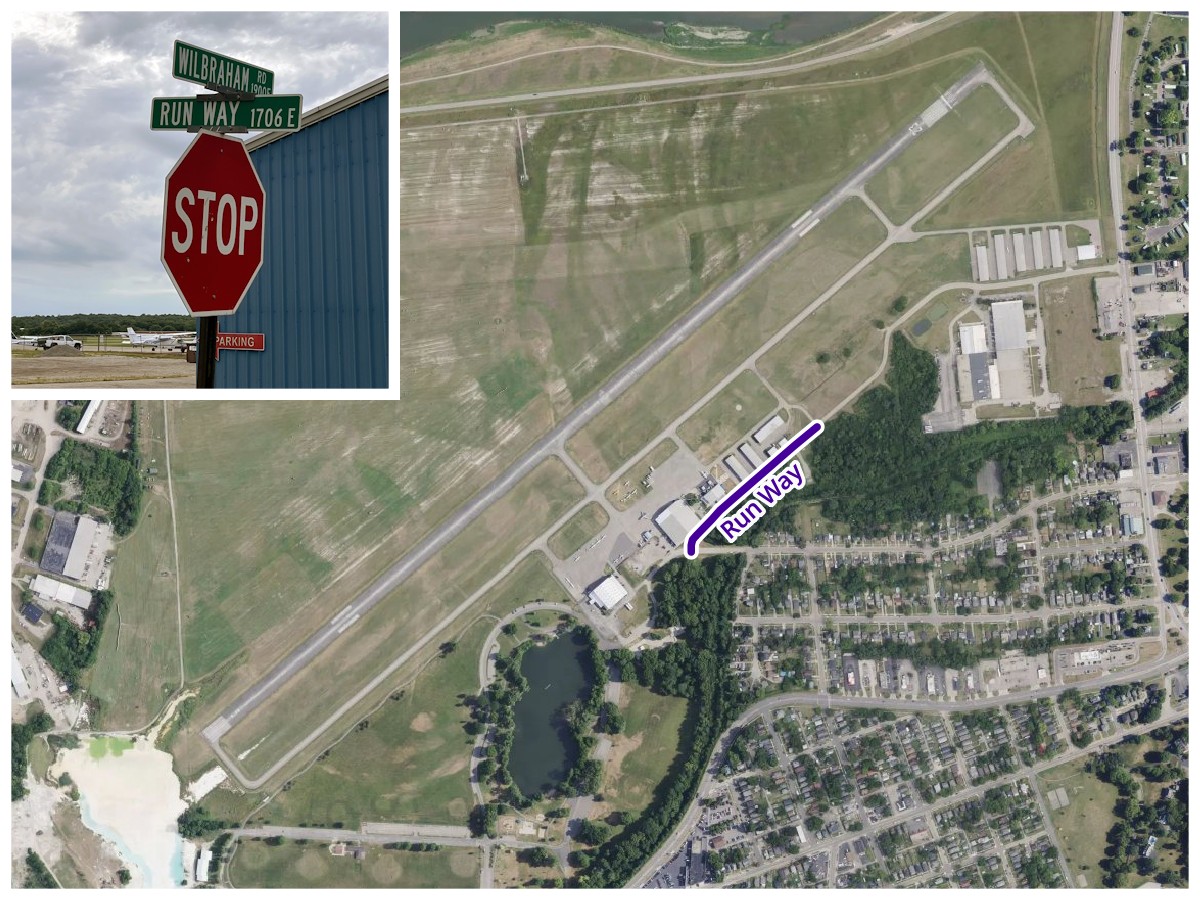
Run Way and Middletown Regional Airport (MWO), Middletown, Ohio
Basemap © Mapbox © OpenStreetMap (Improve this map)
Technical Details
Since I already manage my driving log data using Python and GeoPandas, I opted to use them for this project as well. My completed script is available on GitHub:

Overall Process Flow
Ultimately, the script is trying to combine OpenStreetMap (OSM) data and driving log data into a single output database of traveled roads.

Getting and Preprocessing OpenStreetMap Data
OpenStreetMap has three primary data types: nodes (points in space), ways (lines made from a sequence of nodes), and relations (collections of nodes, ways, and/or other relations to represent a particular thing on the map).
Road geometry is represented by ways. A road typically follows a single way until something changes, such as reaching an intersection. So a single named road is usually made up of multiple consecutive ways (where two ways are consecutive if they share a node).
Numbered routes are represented by relations. At its simplest, it’s a single relation (such as Ohio Route 4) which contains all the ways that the route follows. For numbered routes that cross state lines (like interstates), there’ll often be a relation for the entire route, which contains relations for the part of the route in each state, each of which contain a relation for each direction (e.g. northbound and southbound), each of which contains ways. This means we’ll have to keep track of parents and children of relations, so we can traverse their trees later.
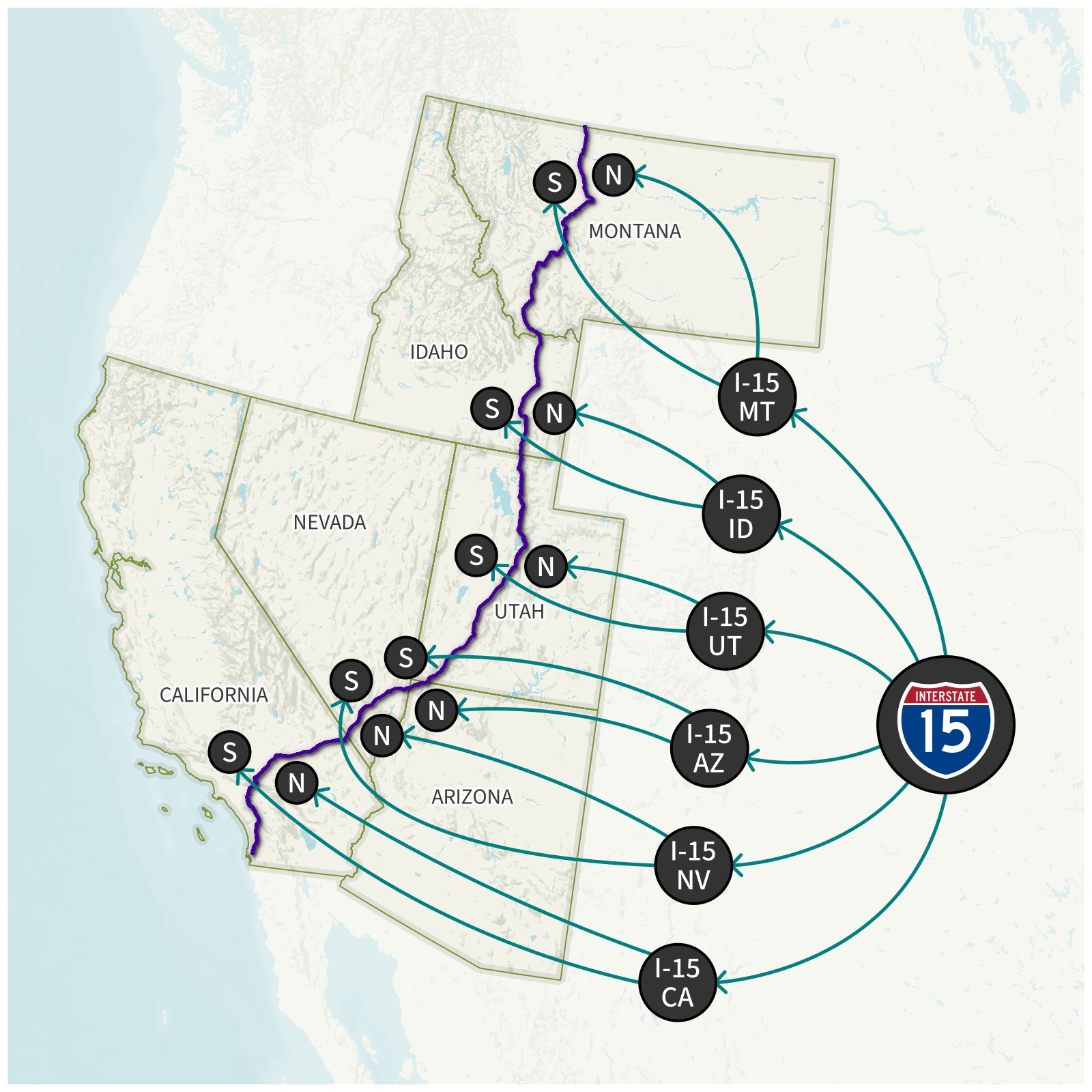
Interstate 15 OSM Relation Tree. The first time the script comes across a way that belongs to an I-15 relation, it traces out the whole tree to get all I-15 relations, then treats all of their collective ways as I-15’s geometry.
Using Geofabrik, we can download OpenStreetMap PBF extracts for all of the regions in our driving log. In my case, I downloaded .osm.pbf data extracts for the United States, Puerto Rico (which is separate from the United States extract), and eight other countries; this was about 28 GB of data.
This data is far more than we need, since OpenStreetMap has far more than just roads. We need to filter the extract down to only ways that are roads, and only relations that are numbered routes. Osmium Tool is great for processing OSM data on MacOS or Linux systems. (Unfortunately, it’s a pain to run it natively on Windows, but I’ve had some success by using WSL.) For this project, I used an M5 MacBook Air.
First, we need to combine all of the OSM PBF files for our regions into a single PBF file. I used the following command to merge my nine countries and Puerto Rico (update it with your own regional filenames):
osmium merge au.osm.pbf ca.osm.pbf de.osm.pbf gb.osm.pbf is.osm.pbf jp.osm.pbf nz.osm.pbf pr.osm.pbf se.osm.pbf us.osm.pbf -o intl.osm.pbf
Then, we filter this dataset down to only road-related ways and relations:
osmium tags-filter intl.osm.pbf w/highway=motorway w/highway=trunk w/highway=primary w/highway=secondary w/highway=tertiary w/highway=unclassified w/highway=residential w/highway=motorway_link w/highway=trunk_link w/highway=primary_link w/highway=secondary_link w/highway=living_street r/type=route,route=road r/type=superroute,route=road -o intl_roads.osm.pbf
w/ represents ways, and r/ represents relations. (Nodes associated with matching ways and relations are automatically included).
We are intentionally not including service roads to avoid picking up minor things like parking lots.
In my case, this filter brought me down to about 4 GB of road and relations data; still large, but manageable.
Python still can’t use this data directly; we have to do some preprocessing to convert it to data types that Python understands. Fortunately, there’s also an osmium library for Python. Notably, it contains a SimpleHandler class which can read an OSM PBF datafile and apply custom methods to nodes, ways, and relations. We can use this to create a GeoDataFrame of ways, and indexes linking relations to ways, ways to relations, and relations to parent/child relations. (Node indexes turned out to be unnecessary; see Speeding Up Performance below.) We also load the ways geometry into a GeoPandas GeoDataFrame, and then create a spatial index, which will allow us to quickly find ways by location later.
Matching Tracks to OSM Ways
This script uses a driving log in the format described in my GPS Log Tools.
Before we go further, we need to define some terminology we’ll be using:
- A point is a latitude and longitude pair, representing a specific location on Earth’s surface. OSM nodes are points.
- A linestring is a series of points, connected together by lines. OSM ways are linestrings.
- A multilinestring is a collection of one or more linestrings.
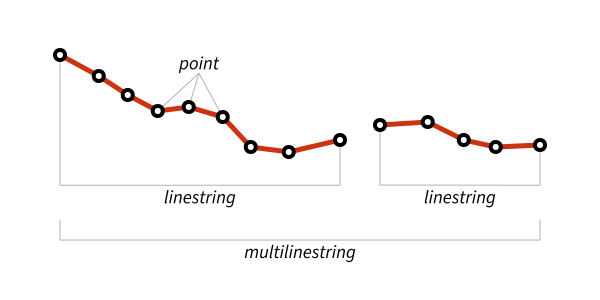
Each of the driving tracks in the GPS log is a multilinestring, and contains one or more linestring segments. The vast majority of tracks will have exactly one segment, but technically they could have more than one, so that we can split GPS tracks at 180° longitude (as tracks crossing 180° causes problems in a lot of mapping software). We will loop through every segment of every track (which we’ll call track segments) to see what OpenStreetMap road ways they use.
Once we’re looking at a particular track segment, we start by looping through each point and looking up which OSM way is closest to it. However, since GPS data can be noisy, we could be at risk of a stray track point picking up a road we never drove on. To mitigate this, we’ll require that four points in a row need to be closest to the same way before we accept the way.
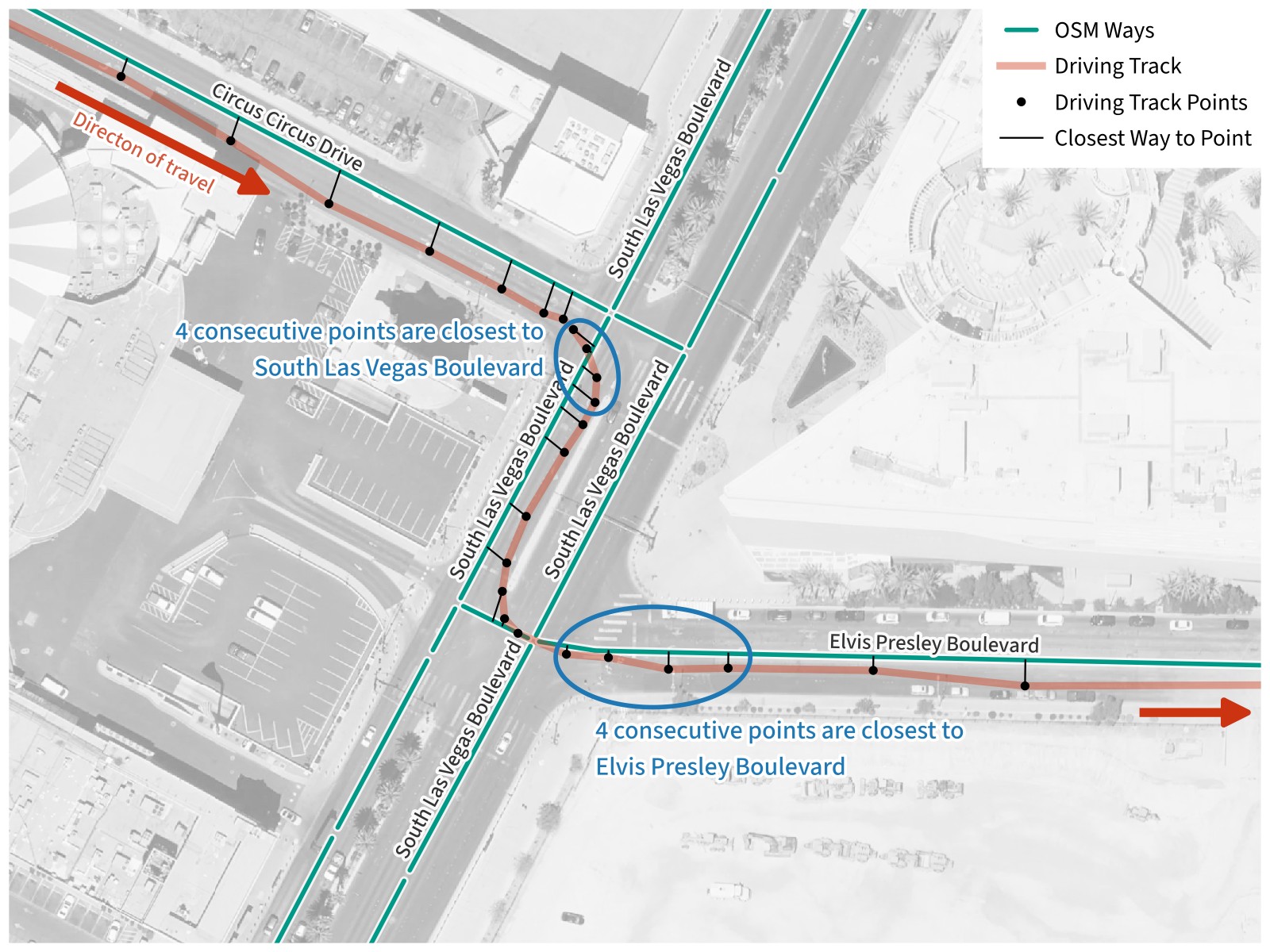
Matching Tracks to OSM Ways. Driving through some desert town, we’re traveling southeast on Circus Circus Drive. As we turn southwest, four consecutive track points are closest to an OSM way for South Las Vegas Boulevard, so we add this to the list of ways traveled on. The same process is repeated when we turn east and four consecutive track points are closest to a way for Elvis Presley Boulevard.
Basemap © Mapbox © OpenStreetMap (Improve this map)
Since GPS track segments are often simplified by taking out extra points in straight segments of road, we could run into the problem that valid short, straight ways may not have four points on them. To solve this, we will also accept having four consecutive points match ways which have the same name, or having four consecutive points match ways which all share the same route relation.
When we’re done, we end up with a list of OSM way IDs in the order that they were traveled on.
Tracing Roads
Once we know that we’ve driven on a given way, we need to record which road (or roads) it belongs to.
First, we check for numbered routes. For each route relation the way has (it may have none), we traverse the tree of OSM relations to get all reachable relations with the same network and route number, and then get all of the way IDs associated with all of these relations. We look up the geometry for all of these ways to create a MultiLineString, and store that and the name of the route in a dictionary record in a list of found roads. Finally, we store all of the route’s relation IDs in a set of found relation IDs, so that if we ever match any of the found IDs again, we can ignore them (because they belong to a numbered route that we’ve already found and recorded).
Next, we check if the way has a name, which means it’s a named road. Starting with this way, we find all ways within 100 meters which have the same name, then repeat for each of those ways, and so on until we can no longer find any matching ways. We add all of these way IDs to a common set of found way IDs so that we can ignore them in the future. Finally, we check if the road is distinct enough from the routes we found. If the road has no more than 95% of its ways in common with any of the routes, we create a dictionary record with MultiLineString geometry from all of its ways and append it to the list of found roads.
Once this is complete for every track segment, we have a complete list of visited roads in the order they were first visited. We convert this to a GeoDataFrame, then export it to a GeoPackage, and we’re done!
Speeding Up Performance
As I developed the script, I started small, using only the first two trips in my driving log: a 2010 visit to Salt Lake City, Utah. The trip had only nine driving log tracks, and only required OSM data for a single U.S. state, so it ran nearly instantly.
Once I had a lot of the core logic done, I started using my entire driving log (over 17 000 tracks) and a dataset for the whole United States. (Though my driving log contained international driving, international tracks wouldn’t match any roads in the U.S. dataset).
The preprocessing was starting to take a few minutes. Since the OSM data was constant between every run, I had the script save the preprocessed data into two files: a feather file for ways (which contain geometry), and a pickle file for everything else. If those files were present, it could load straight from them, rather than having to do the preprocessing every time.
Then I added the international OSM data, and things became glacial. Each driving track iteration was taking slightly over a second, which meant the entire script was taking over five hours to run. Though this was still technically useable (at least I could run it overnight), I felt I could do better.
My lowest-hanging fruit was limiting my use of GeoPandas. I needed it to read and save GeoPackage files and to build the spatial index, but because I was already using it, I was passing GeoDataFrame and GeoSeries objects around my script, including within loops that were running tens of thousands of times. While GeoPandas is nice to work with, that was creating a lot of overhead. Within the loops, I converted GeoPandas objects to native Python data structures (dictionaries, lists, and sets)… and my iterations went from just under a track per second to about 230 tracks per second! The whole script, including loading the cached data, now took about half an hour to run.
There was still some room for improvement, though. Though loading preprocessed data saved me time, it was still taking a few minutes just to load the cache. The script also ran for a few minutes after writing the output roads file, presumably doing some sort of data collection. This meant that I was probably trying to create and use too much data, so I started looking at what I could update.
First, I took my spatial index out of the cache. It only took a few seconds to calculate, even on the international dataset, so it actually took longer to load it from a file than to just recalculate it each time.
Second, I had originally traced named roads by following ways that shared a node (meaning they were contiguous), which meant that I had to build up an index of nodes and what ways they belonged to. I did a quick check, and realized that I was building an index of over 40 billion nodes, each of which contained a list of one or more way IDs.
Yeah, no wonder I was having performance issues.
By then I was already thinking about doing a spatial query for same-named ways within a given distance try to handle gaps (roundabouts, incorrectly coded ways in OSM data, and making sure that both sides of a named road with a median were counted as a single road). With a distance search, there would be no need to follow ways through nodes, because any contiguous way would be found in the distance search anyway. I tried it out, and although it very slightly slightly lowered my iteration speed (to about 190 tracks per second), the lower overhead more than made up for it. My script now runs in about 2.5 minutes on the international dataset if it can use cached data (and in about 12 minutes if it needs to build the cache). That’s a pretty big improvement from the original 5+ hours!
Conclusion
Before I started this project, I never had any reason to doubt that I knew what a road was. It turns out that uniquely identifying roads quickly becomes philosophical. I came up with definitions I was largely satisfied with, but someone else could make other choices legitimately and come to a different number of roads.
When I’m visiting a new city, I tend to try to get by bearings by slightly varying my routes whenever feasible to learn each city’s road network, so I can get around without relying on GPS navigation as soon as possible. Doing this for years turned out to be a boon for this project, as it gave me a lot more roads to count. Twenty thousand roads is a lot to go down, and I’m glad for all the small-city travel I’ve done that ended up helping me reach that milestone.
I’ve played around with OpenStreetMap before, but mostly as a source of road shapes. This project really forced me to learn the structure of OpenStreetMap data and how to efficiently work with it. While it has some limitations, I’ve now got a good idea of how I can use it on future projects.
And the song has been living in my head for a month as I’ve worked on the project. Alas.